Single Artifact, Multi-Cloud Deployments
Dec 22, 2025
8 mins read
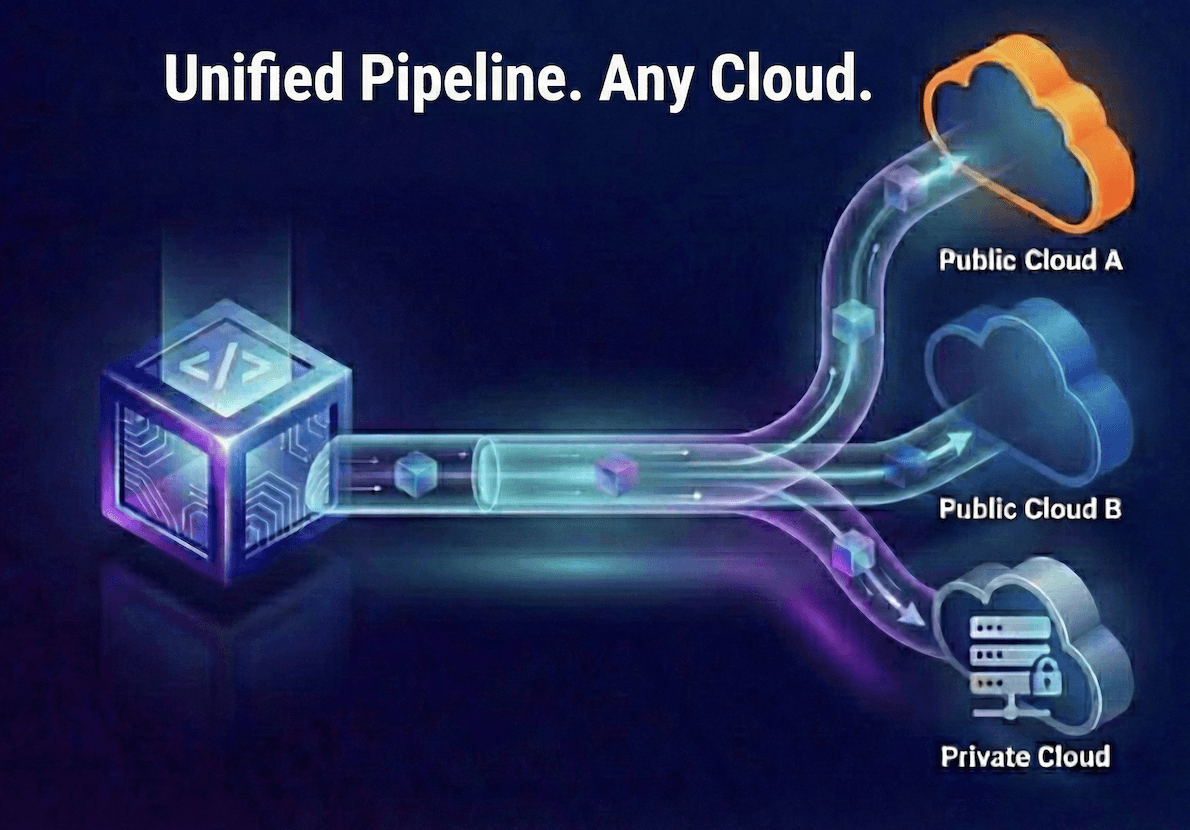
When we made the decision to run our Digital Twin platform on both AWS and Azure, the technical feasibility was never in question. The real challenge was operational: could we support multiple clouds without doubling our engineering overhead?
We'd observed the typical multi-cloud pattern at other organizations: separate CI/CD pipelines for each provider, deployment scripts that diverge over time, and fragmented observability across environments. Teams end up maintaining parallel infrastructure that slowly becomes incompatible, requiring constant manual reconciliation.
We were determined to avoid this outcome.
This post details our approach to multi-cloud deployment – specifically, how we built a unified pipeline that deploys identical artifacts to multiple cloud providers without duplicating our build process. The architecture we developed allows us to:
Build once and deploy to AWS, Azure, and private environments
Maintain a single codebase with minimal cloud-specific logic
Use consistent deployment patterns across all environments
Preserve operational visibility regardless of where code is running
The key insight: by carefully separating build-time concerns from deployment-time concerns, we achieved genuine portability without sacrificing the ability to leverage cloud-specific capabilities where they matter.
The Problem We Were Trying to Avoid
Most multi-cloud architectures eventually suffer from the same issues: each cloud provider ends up with its own CI/CD pipeline, deployment scripts that start identical but slowly drift apart, inconsistent artifact management and promotion strategies, and excessive manual coordination between teams. The result is technical debt, operational overhead, and increased risk of errors across your infrastructure.
You set out to do multi-cloud, and you end up with multi-everything.
We wanted something simpler: one build, one pipeline, many environments. Cloud-specific stuff should only show up where it actually matters – when you're talking directly to ECS or Container Apps, RDS or Azure databases, that kind of thing.
So we made a decision early on: the build process is completely cloud-agnostic. The deployment is environment-specific, sure, but it follows the same patterns everywhere.
How It Actually Works
Let’s walk through what happens when someone ships code.
Developer pushes to main
CI/CD builds containers, assets, configuration – the usual stuff
Everything gets uploaded to object storage and container registry (more on this in a sec)
We write a small JSON file that basically says "hey, there's a new deployment ready"
Each environment has a deployer that polls for these notifications
The deployer grabs the artifacts, runs the deployment, uploads logs, and updates the status
Services start up, figure out where they are, and connect to the right stuff
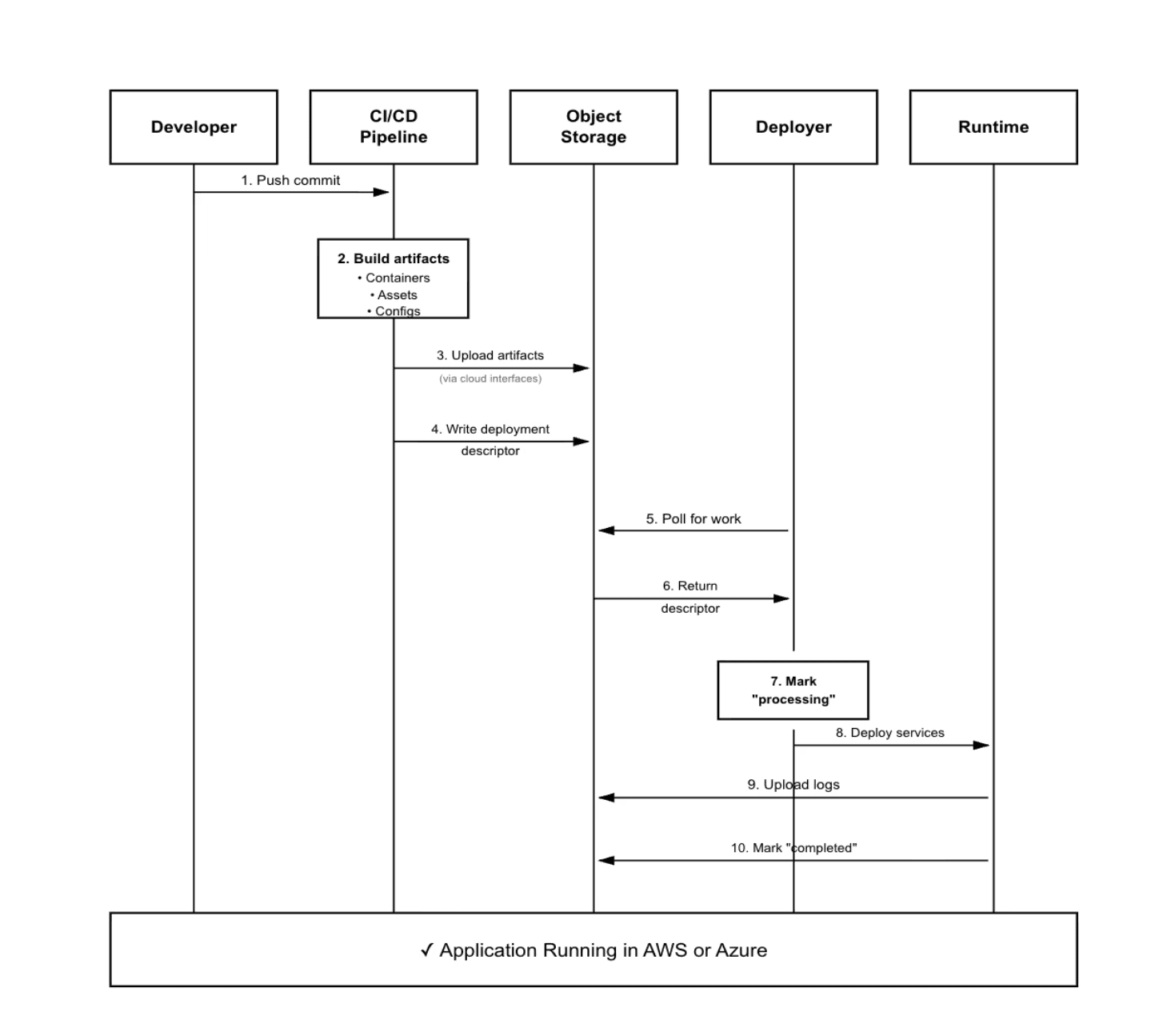
The core idea is pretty simple: we push artifacts to one shared location, and each environment pulls what it needs when it's ready.
Phase 1: Build Everything Once
When a PR gets merged, our CI/CD does one build. Not an "AWS build" and an "Azure build." Just the build.
What Gets Built
Container images - All our backend services as Docker images
Static assets - Frontend bundles, CSS, images, all that
Configuration bundles - Environment templates, database schemas, helper scripts
Deployment metadata - Version numbers, git commit, timestamps, checksums
The important thing: none of this knows or cares where it's going to run. No AWS-specific stuff, no Azure-specific stuff. Just artifacts.
The Deployment Descriptor
Once everything's built and uploaded, the pipeline writes a small JSON file we call a deployment descriptor:
This thing basically says: "Hey customer-xyz, there's a new deployment available. Here's the version, here's where to find it."
That's it. Build phase done. We've created something that any environment can understand and use.
Phase 2: Deployers Do Their Thing
Here's where it gets interesting.
In every customer environment – whether that's an AWS account or Azure subscription – we run a little deployer service. It lives inside the customer's network and just does this loop forever:
Check object storage for new deployment descriptors
Find one? Claim it so nobody else tries to deploy the same thing
Download the artifacts
Run the deployment scripts for this specific environment
Upload logs back to central storage
Mark it as done (or failed)
The deployer is intentionally simple. It knows how to talk to object storage, run scripts, and report back. That's about it.
The Environment-Specific Part
Once the deployer has everything downloaded, it runs deployment scripts. These are cloud-specific:
We're not trying to make ECS and Container Apps look the same. They're different and that's fine. The key is they're both working with the same artifacts and the same deployment descriptor.
Phase 3: Services Start Up
After deployment finishes, services come online. This is where our abstraction layer really helps.
How Services Start
No matter where a service is running, startup looks basically the same:
Figure out the environment - Check metadata services to see if we're in AWS, Azure, or somewhere else
Load configuration - Download config files from object storage
Connect to stuff - Database, queues, whatever the service needs
Start serving traffic - Once everything's wired up, go live
Behind these simple calls, we have a thin layer (we call it Cloud Interfaces, but it's really just a handful of adapters) that routes to the right place:
AWS → Secrets Manager, S3, SQS
Azure → Key Vault, Blob Storage, Service Bus
Local → Kubernetes secrets, local disk, local queue
Same code everywhere. Different infrastructure underneath. The services don't know which cloud they're in – the system figures it out at runtime.
The Cross-Cloud Identity Challenge
Okay, so here's where things get messy. Sometimes Azure workloads need to access AWS resources.
Real examples from our setup:
Pulling container images from our central ECR registry in AWS
Reading shared configuration files from a central S3 bucket
Accessing shared data or artifacts that live in AWS
The naive solution? Store AWS access keys in Azure Key Vault and use those. But that felt really wrong for a bunch of reasons:
Long-lived credentials are a security risk
They don't rotate automatically
If they leak, you're in trouble
Hard to audit who's using them for what
We were not going down that path.
The Solution: Workload Identity Federation
Instead, we use workload identity federation. It sounds complicated, but the idea is actually pretty elegant.
1. Azure services run with a managed identity
No credentials stored anywhere. The service just "is" authenticated because Azure says so.
2. Request an OIDC token
When the service needs AWS access, it asks Azure's metadata service for a short-lived OIDC token. This token basically says "Azure vouches for this workload."
3. Exchange with AWS STS
The service hands that token to AWS STS (Security Token Service) using AssumeRoleWithWebIdentity. AWS has been configured to trust tokens from Azure for specific roles.
4. Get temporary credentials
AWS validates the token and issues temporary credentials (good for about an hour) tied to a specific IAM role.
5. Scoped access only
That IAM role has narrow permissions—like read-only access to specific ECR repositories or certain S3 prefixes. Nothing more.
6. Credentials expire automatically
After an hour, they're dead. No cleanup needed, no revocation process. They just stop working.
Why This Matters
No stored credentials - Nothing to leak or manage
Automatic expiration - Credentials die after an hour
Fine-grained access - Each role only gets what it needs
Full audit trail - AWS CloudTrail logs every assume-role call
Works both ways - We can do the reverse too (AWS workloads accessing Azure)
The best part? Our application code doesn't know or care about any of this. The abstraction layer handles authentication, and services just read from "object storage" or pull from "the registry."
What This Gets Us
After building this system, here's what we achieved:
One Source of Truth: There's only one build for each version. If a bug ships to AWS, the exact same bug ships to Azure. That might sound bad, but it's actually good—because when you fix it, the fix goes everywhere.
No Pipeline Divergence: We don't have parallel CI/CD systems slowly becoming incompatible. There's one pipeline, one set of artifacts, one promotion flow.
Instant Multi-Cloud: When we onboard a new customer environment, we deploy the deployer service and configure it to watch our shared storage. That's it. It immediately has access to all past releases and will automatically get all future ones.
Environment Flexibility: A customer wants to run in their own AWS account? Fine, spin up a deployer there. Do they want Azure in the EU? Same deployer, different region. They want on-premises with Kubernetes? The deployer works there too.
Operational Consistency: When we look at deployment logs, they follow the same format whether they're from AWS or Azure. When we troubleshoot, we're looking at the same artifacts, same versions, same process.
Security Without Compromise: No long-lived credentials crossing cloud boundaries. Everything uses short-lived tokens and scoped permissions. Full audit trails in both clouds.
The Lessons We Learned
1. Abstractions Should Be Thin: We didn't try to make AWS look exactly like Azure. Our cloud interfaces abstract just enough—the common operations like "read this file" or "get this secret"—but they don't hide the underlying cloud primitives completely. When you need cloud-specific features, you can still access them.
2. Metadata Is Everything: That small deployment descriptor file is the glue holding everything together. It's versioned, it's immutable, and it's the single source of truth for "what is release 2024-001?"
3. Test Your Assumptions Early: We validated the workload identity federation approach with a proof-of-concept before committing to it. Cross-cloud authentication is complex; make sure your security model works before you build your entire system around it.
The Results
Today, when we ship a release:
One build creates universal artifacts
Deployment descriptors notify all environments
Each environment deploys autonomously
Services start up and adapt to their cloud
We get unified observability across everything
We deploy to multiple environments across AWS and Azure. When we push a release, it's available to all of them within minutes. When we need to add a new environment, it takes an hour, not a week.